August Workplace Learning and Performance Improvement Article Links

Performance Management: We Won’t Fix The Problem by Ignoring It.

The Real Test of a Manager? Its Successfully Fighting For Your Team.

Eight Leader Habits of a Learning Culture.

6 Common Networking Mistakes to Avoid.

5 Models to Pull Out of your Hat on a Moment’s Notice.

8 (Mostly) Digital Alternatives to Meetings.

The Message is Clear: Workers Still Want Balance, Growth, Advancement

Become an Expert in Instructional design

The Enormous Cost of Unhappy Employees

How to Create Index Cards in Word 2007

index picWhen planning and organizing trainings, index cards can be used in many ways. I have used index cards for ice breaker activities, case studies, self evaluations as well as organizing presentation ideas, creating storyboard ideas and researching various training topics. Microsoft Word 2007 allows you to type directly on an index card without having to use a pencil or pen.

  •  In Word 2007, open a blank word document.

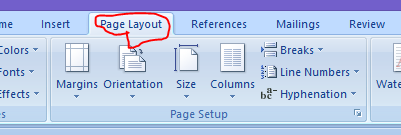
page layout click

  • Click on page layout
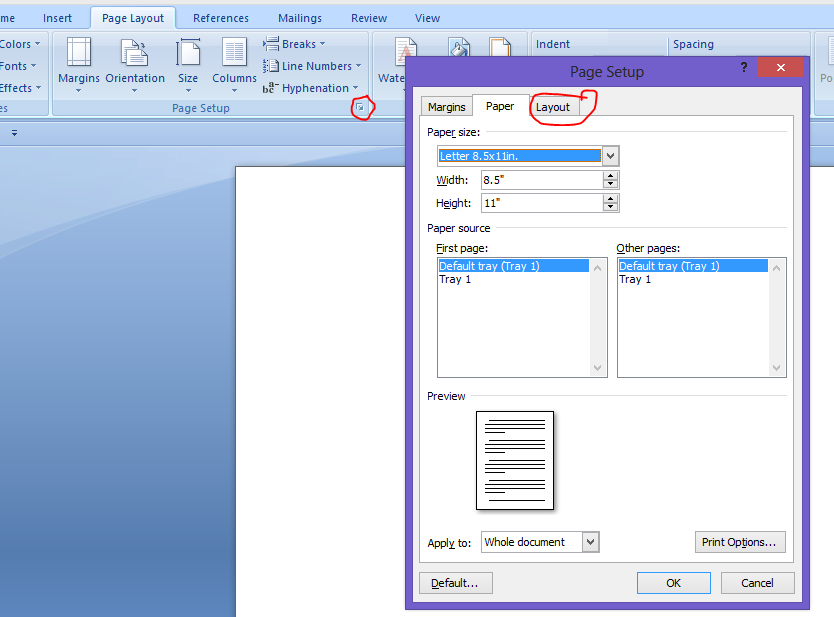
  • Click page set it which well automatically set the page to letter 8.5×11′

pagelayout2

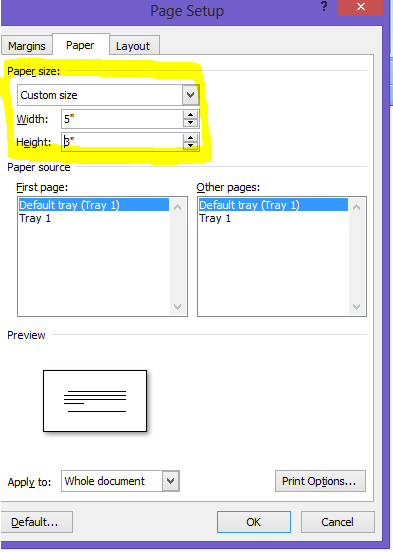
custom size

  • Scroll down to custom size
  • Click custom size
  • Change the width from the default 8.5 to 5″ and the default height from 11″ to 3″.
  • Once complete, click okay.

new index card

  • You can now begin typing onto your index card

adding an additional card

  • If you would like to make additional cards, continue to press enter for the number of cards you would like to make.
  • Don’t forget to save your index cards
  • You now have your own index card template typed and ready to go!!

Bloom’s Revised Taxonomy Job Aid App

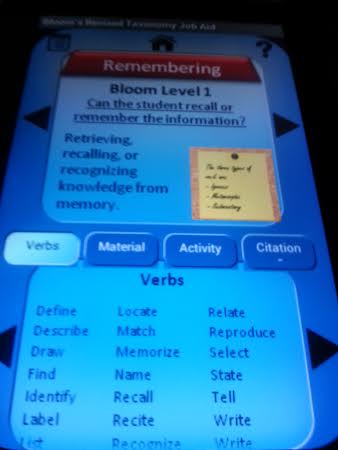
bloom app reviewBloom’s Revised Taxonomy Job Aid (free download on Google Play) by Orion Beadling, is a hierarchical model for classifying learning instructional activities and provides educators, instructional designers, and human performance technologist with a job aid

The app highlights each level and includes the verbs, suggested material, activity  and a citation.

bloom pic1 For example, at the remembering level, the app includes several verbs which can be used for a lesson plan or an instructional design. The arrows on the top part of the app will advance you to the next level. You also have the option of moving from each section by either tapping on the topic such as material or  you can use the right and left arrows.

Overall, it is an easy app to use and provides you with all the necessary information you need to develop a learning objective or lesson plan.


Using the Correct Action Verb for Learning Objectives

understand photo

In 1956, Benjamin Bloom and other educators met  for a second time (the first time was in 1948) at the Convention of the American Psychological Association, where Bloom spearheaded a group to discuss classifying educational goals and objectives. This framework became know as the Taxonomy of Three Domains.

Focusing on the cognitive domain, Bloom developed a multilevel model as a means of classifying thinking based on six levels of cognition. Robert Mager, an educational psychologist would later develop and use learning objectives as a means to describe what the learner is expected to achieve. According to Mager, the learning objectives should include a measurable verb.

All too often, I have either come across or attended a training where the learning objective in the course used verbs that are difficult to measure. Such as:

  • appreciate
  • know
  • learn
  • understand (my favorite)

These verbs are vague and are difficult to measure learning. I included a PDF on action words that can be used when writing learning objectives.

screencap_verbs

download here

Workplace Learning and Performance Improvement Articles


Why Matching Informal and Formal Learning is in Style

6 ways to Build Atmosphere and Emotion in your e-learning theme

Achieving Worthy Performance in Healthcare Instructional Design

ASTD Reboots with New Name and Logo

Focus- The Forgotten Performance Skill 

Top 10 Signs that You Might be Doing Social Learning Wrong

5 Reasons you Need to be Using Games for Corporate Training

Instructional Design Models and Theories

A Quick No-Nonsense Guide to Basic Design Theory

4 Ways to Make Training More Fun for Repeat Learners

Do Old School Workplace Rules and Hierarchies Still Matter

How to Give Feedback on Assessments 

What Separates Great Trainers from the Merely “OK?”

Your Company Culture Could be Killing Performance


How to Print on Post It Notes

DSCF0819[1]

Okay. I will admit it. I am a post it note junkie! I buy post it notes every time I walk into a store that sells them. No color, shape or size is safe from my clutches! Long gone are the days when post it notes were used for taking messages and writing down information.As a learning and development trainer, I use post it notes not only in my training as part of a learning activity, but also in organizing my own ideas in creating a lesson plan or a training event.

Through the magic of pinterest, I discovered ways to print on post it notes that I would like to share with you.

  • Using a 3×3 post it note on word 2007, I created a post it note template which you may download the post it note here. I decided to use the printed post it notes as part as a post evaluation activity.  The questions I printed on the post it notes are:
  1.  List five things you learned today.
  2. Describe ways to prevent conflict in the workplace.
  3. Explain how you will apply what you learned today in sensitivity training.
  4. Explain ways you will prevent abuse.
  5. Describe ways you will encourage choice making.
  6. Further questions I have.
  • Once I created the template, I did a save as and labeled it blank

DSCF0735[1]

  • Using the same template, I did a save as and labeled it words. I then created words to print on the post it notes.

DSCF0746[1]

Once completed, I placed post it notes on each of the templates,

DSCF0741[1]DSCF0744[1]

  • My first try the post it  notes crumpled through the printer.DSCF0751[1]
  • I also noticed the words on the post it notes were not aligned on the left side so  I taped the back of the post it notes to the paper and I then measured the distance  from template and tried again and viola!!
  • DSCF0824[1]

If you are not as obsessed with post it notes as I am, you can use the printed template to make copies to cut out and use.

So, what do you think? I love to hear from you.


Asthma and Allergy Awareness Month

asthma month2014

Links for asthma and allergy resources

Training for Health Professionals

American Lung Association Basic Online Course

Asthma and nutrition training module

Asthma on Wheels: teacher training module

Asthma Program: Indiana Department of Health

Food Allergy Tools for Schools


April 20014 Article Links

Every month, I gather articles and postings that I tweet as an added resource on information that focuses on workforce issues, training and performance and mobile learning.


Abilities Expo

On Saturday, I attended the Abilities Expo in New Jersey. As a learning and development professional, it is always exciting to attend events where I am able to connect with others and learn something new that I will be able to share with others.

One of the booths that caught my eye, was the New Jersey  Disability Rights, a federally funded non-profit organization that advocates for people with disabilities in New Jersey by promoting public awareness, and providing education, and technical assistance.

As a conference/expo attendee, I tried to only pick up information which I felt I could be incorporate in my trainings and blog. For instance, I noticed a bulletin on assistive technology for persons with low vision. As a trainer on developmental disabilities topics, I though it might be useful to incorporate some of the information in the bulletin on the devices that are available for reading, using a computer and daily living activities.


DSCF0765[1]

The ARC of New Jersey, an affiliation of the ARC of the United States, displayed some literature on many of their programs including, a Criminal Justice Advocacy Program, designed to help the courts and corrections system to work with people with development disabilities and a family advocacy program, which helps families with of individuals with developmental disabilities help navigate the system.


DSCF0761[1]


DSCF0760[1]

Overall, I had an inspiring day in meeting new people, and learning something new in the process.
Abilities Expo

ae-whole-logo

The Abilities Expo will appear at the Raritan Center in Edison, New Jersey this weekend.

This free expo brings products and services for people with disabilities, families and healthcare professionals. The expo also includes a presentation on martial arts therapy and the walk and roll dance team. The New Jersey Assistive Technology Center will sponsor the assistive technology showcase which includes using smart phones, ipads, and kindles for cognitive and sensory impairments.

http://www.youtube.com/watch?v=mGKP_Zok9Rc

The hours for the expo will be:

Fri, May 2: 11am-5pm

Sat, May 3: 11am-5pm

Sun, May 4: 11am-5pm

Location:

New Jersey Convention & Expo Center

@ Raritan Center97, Sanfield Avenue, Edison, NJ

Click here for directions.  For more information, click here.

Future Abilities Expos:

Chicago: June 27-29

Houston: July 25-27

Boston: Sept. 5-7

Bay Area: Nov. 21-23